
Email server ianzn.com
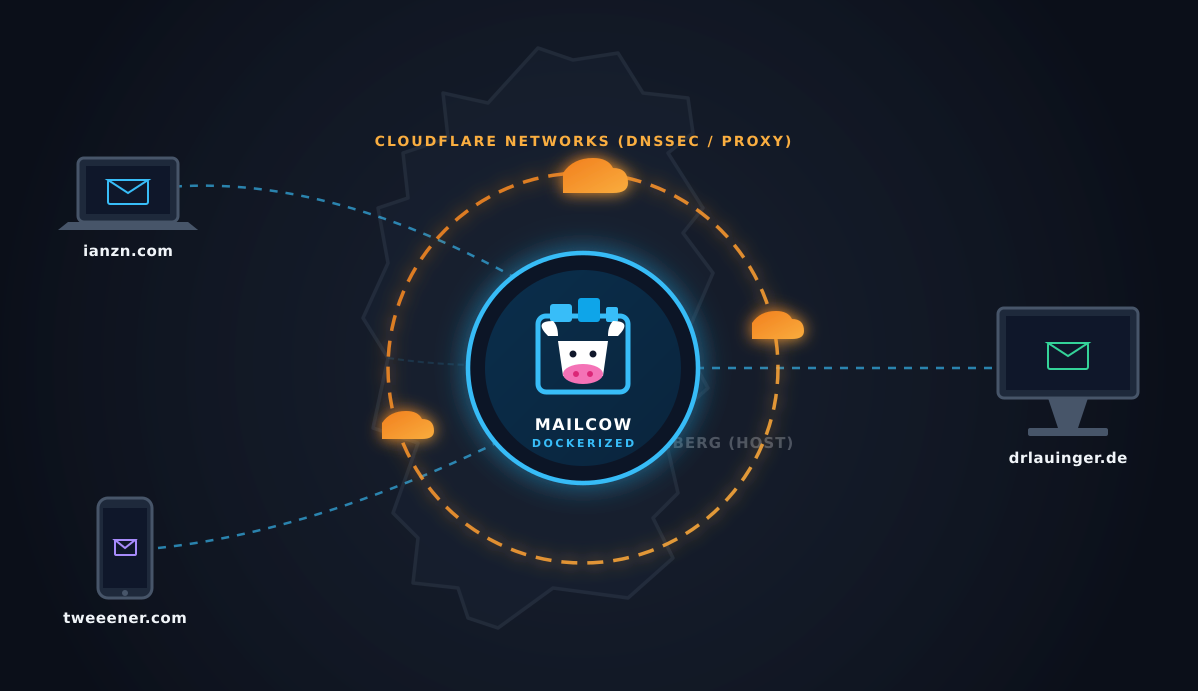 AI-generated
3 Years of Self-Hosting Mail: How I Run a Bulletproof Mailcow Server in production.
Self-hosting an email server has gained a reputation as a modern tech horror story. If you mention it on Reddit or Hacker News, you will inevitably be flooded with warnings: "Your IPs will get blacklisted," "Deliverability is impossible," "Just pay for Google Workspace or Microsoft 365."
Yet, here I am, three years later.
For the past 36 months, I have been successfully running a production-grade mail server using Mailcow: dockerized. My server doesn't just manage one personal inbox; it actively handles critical routing and delivery for three different domains: 'ianzn.com', 'drlauinger.de', and 'tweeener.com', serving active production mailboxes like '[email protected]', '[email protected]', and '[email protected]'.
Here is a look under the hood at how I achieved 100% deliverability, rock-solid security, and a low-maintenance setup that has stood the test of time.
The Core Infrastructure
When self-hosting email, your hosting environment and geographic location matter immensely for your IP reputation.
- The Host: My Mailcow deployment runs on a hardened, secure cloud instance located in Nürnberg, Germany. Germany offers strict data privacy laws (GDPR compliance out of the box) and excellent routing infrastructure throughout Europe and North America.
- The Architecture: Mailcow relies heavily on Docker, isolated containers, and an extremely efficient stack comprising Postfix, Dovecot, Rspamd, and SOGo.
Mastering the DNS & Deliverability Gauntlet
The secret to why my emails actually land in the inbox (and bypass spam folders at Gmail, Outlook, and Yahoo) comes down to an uncompromising DNS setup. If your crypto, routing, or verification records are missing even a fraction of a degree, big tech will drop your packets.
Over the last 3 years, I have successfully configured, verified, and maintained support for the following core protocols:
1. Identity & Anti-Spoofing Architecture
- SPF (Sender Policy Framework): Explicitly defines which IPv4 and IPv6 addresses are authorized to send mail on behalf of my domains.
- DKIM (DomainKeys Identified Mail): Every outgoing email from 'jp@', 'serve@', or 'praxis@' is cryptographically signed at the server level, proving the message hasn’t been tampered with mid-transit.
- DMARC (Domain-based Message Authentication, Reporting, and Conformance): Tieing SPF and DKIM together, my DMARC policies tell receiving servers exactly how to handle unauthorized mail attempts, strictly enforcing domain alignment.
2. Network-Level Authenticity
- PTR (Reverse DNS) Records: Crucially mapped for both IPv4 and IPv6. Many self-hosters forget IPv6 PTR records, causing immediate rejections from modern receiving relays.
- A & CNAME Records: Methodically pointed and isolated to separate mail traffic handling flawlessly from web traffic.
3. Next-Gen Security & Encryption Verification
- DNSSEC via Cloudflare: All my domains utilize Cloudflare for DNS, with DNSSEC fully enabled. This adds a cryptographic signature to the DNS records themselves, preventing DNS spoofing and cache poisoning attacks.
- TLSA (DANE): By publishing TLSA records in my DNSSEC-protected zone, I provide fingerprint verification of our TLS certificates. This forces opportunistic TLS to become mandatory TLS, neutralizing man-in-the-middle (MITM) downgrading attempts.
4. Seamless User Experience
- Autodiscover & Autoconfig: Fully enabled. Setting up a new client on a phone, tablet, or desktop requires nothing more than entering the email address and password—Mailcow handles the port and protocol negotiation behind the scenes seamlessly.
Hardening and Ops: Keeping the Lights On
A mail server is a high-value target. To keep this infrastructure up and running cleanly for 3 years, my operational workflow relies on two strict principles: maintenance hygiene and defense-in-depth.
The Monthly Update Cycle
Mailcow is an incredibly active open-source project. Every month, I run an intentional maintenance window:
- Review the official upstream Mailcow repository updates.
- Check changelogs for security patches or major container updates.
- Pull the updated Docker configs and safely redeploy.
This regular cadence ensures that the system is never trailing behind on security fixes, keeping the software stack modern with minimal technical debt.
Security and Backups
While I can't disclose the granular details of the infrastructure's perimeter defense, the underlying instance is heavily hardened with robust firewall rulesets, proactive intrusion prevention systems (IPS), and network-layer isolation mechanisms designed to drop malicious traffic before it ever hits the Docker daemon.
Furthermore, configuration data and mailbox volumes are backed up systematically and regularly. In the event of a catastrophic catastrophic hardware failure, the entire multi-domain ecosystem can be restored to a clean instance in minutes.
Final Thoughts: Is Self-Hosting Email Worth It?
If you value complete sovereignty over your data, absolute privacy, and the sheer satisfaction of engineering a enterprise-grade network stack, yes, it is worth it. Mailcow abstracts away the absolute worst parts of configuring postfix and mail-routing matrices manually, allowing you to focus on high-level architecture. By combining Docker efficiency with modern cryptographic records (DNSSEC, DANE/TLSA, DKIM), you can run an independent mail server that commands the exact same respect from external spam filters as a multi-billion dollar tech giant.
Three years down, many more to go.